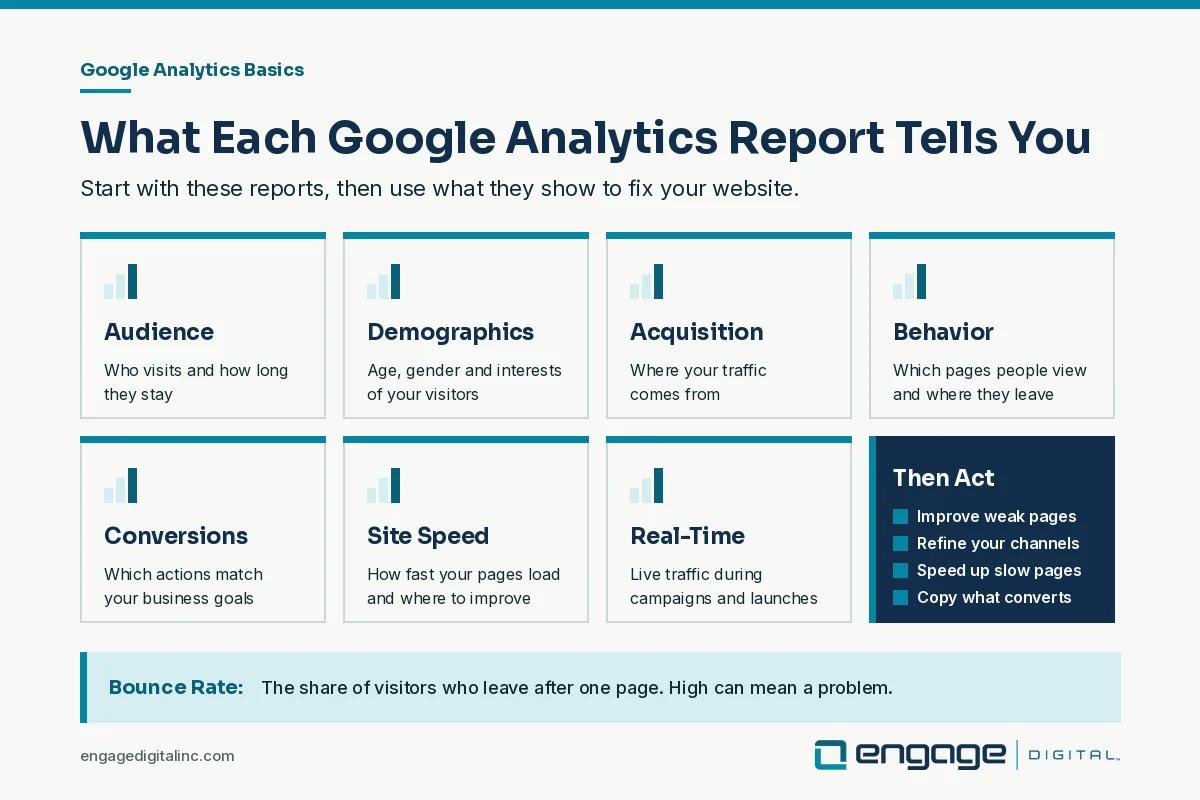
Google Analytics shows how people find and use your website. The basics to watch are audience, demographics, acquisition, behavior, conversions, site speed and real-time data, and each one tells you what to fix.
For businesses and website owners, Google Analytics is a free tool that opens up a world of data about site performance. You can make informed decisions that drive growth, improve user experience, and increase conversions by providing insights into how visitors interact with your website. Pageviews, session duration, demographics: Google Analytics shows what’s working on your site and what needs fixing. If you want to stay competitive, you need data, and Google Analytics is the place to start.
However, finding your way around Google Analytics can feel overwhelming for beginners, as it offers a vast array of metrics and reports. Knowing these metrics is how you get the most out of the tool. In this guide, we’ll break down the essential Google Analytics metrics and show you how to interpret and apply them to boost your website’s performance. From tracking user behavior to monitoring traffic sources, this beginner-friendly overview will help you make data-driven decisions that improve your site and support your business goals.
Why Does Google Analytics Matter for Your Business?
Google Analytics gives you the power to see exactly how users engage with your website, uncovering insights about audience demographics, behavior, and preferences. According to a recent report, 74% of businesses that use data analytics improve their customer experience (Forbes). By understanding your visitors’ journey and preferences, you can tailor your website content, optimize marketing strategies, and ultimately increase conversions. Here are the core Google Analytics metrics and how to use them effectively.
1. Audience Overview: Understanding Your Visitors
The Audience Overview section is one of the most helpful tools for beginners. This section provides a snapshot of who is visiting your website, including metrics like User, New Users, Sessions, Pageviews, and Average Session Duration.
- Users: This shows the number of unique visitors to your site within a specified timeframe.
- New Users: The number of first-time visitors to your website.
- Sessions: The total number of times users interact with your site.
- Pageviews: The total number of pages viewed, including repeated views.
- Average Session Duration: The average amount of time visitors spend on your website.
Tracking these metrics helps you understand your audience size and behavior. For instance, if you notice a high number of new users each month, it suggests your marketing strategies are bringing in fresh traffic. However, if your Average Session Duration is low, it may indicate that users aren’t finding what they’re looking for, which signals an opportunity to improve content relevance or usability.
2. Demographics: Getting to Know Your Audience
Within the Audience section, the Demographics tab provides insights into your audience’s age, gender, and interests. This information is useful for targeting your content and marketing campaigns more effectively. For example, if you discover that a large portion of your audience falls within the 25-34 age range, you may want to create content that resonates with this demographic’s interests and challenges.
Understanding your audience’s Interests also helps tailor content to their preferences, improving engagement rates. Targeted content usually earns more engagement than generic content. Knowing who your audience is will allow you to craft messaging and content that speaks directly to them.
3. Acquisition: How Users Are Finding Your Website
The Acquisition section shows where your traffic is coming from, such as search engines, social media, or direct traffic. Key sources of traffic in this section include:
- Organic Search: Visitors who find your site through search engines like Google.
- Direct Traffic: Visitors who typed your website URL directly into their browser.
- Referral Traffic: Visitors referred to your site from other websites.
- Social Traffic: Visitors coming from social media platforms.
- Paid Search: Visitors from paid search campaigns (if connected).
Knowing where your traffic is coming from allows you to refine your marketing strategy. For example, if Organic Search drives a significant amount of traffic, it indicates that your SEO efforts are working. If social media traffic is low, you may need to put more into your social media strategy to bring in new visitors.
4. Behavior: Analyzing User Engagement on Your Site
The Behavior section helps you see what users are doing on your website, what pages they visit, and how they move through the site. Key metrics to pay attention to include:
- Pageviews: The number of views per page on your website.
- Unique Pageviews: Views that filter out repeated visits to a page within a session.
- Average Time on Page: The average time visitors spend on each page.
- Bounce Rate: The percentage of visitors who leave your site after viewing only one page.
Bounce Rate is a particularly important metric, as a high bounce rate could signal that visitors aren’t finding relevant information. A high bounce rate can mean a page isn’t giving visitors what they came for. By analyzing which pages have higher bounce rates, you can identify content gaps, optimize for keywords, or make your call-to-action (CTA) more compelling.
5. Conversions: Tracking Goals and Measuring Success
The Conversions section in Google Analytics allows you to track specific actions that align with your business objectives, known as goals. These could be form submissions, product purchases or newsletter sign-ups: any action that matters to your business.
Here are some common types of goals:
- Destination Goal: Tracks when a user reaches a specific URL, such as a thank-you page after a purchase.
- Duration Goal: Tracks sessions that last a set amount of time, indicating engaged users.
- Pages/Session Goal: Tracks when users view a minimum number of pages in one session, signaling interest.
- Event Goal: Tracks specific interactions, like video plays or button clicks.
Setting up goals in Google Analytics is essential for measuring your website’s success. You can evaluate which channels and pages lead to the most conversions, helping you optimize high-converting areas and improve low-converting ones.
6. Site Speed: Enhancing User Experience
Site speed is a critical factor in user experience and SEO. In fact, a one-second delay in page load time can result in a 7% decrease in conversions (Akamai). The Site Speed section in Google Analytics provides insights into how quickly your website loads and where improvements are needed.
Within Site Speed, pay attention to:
- Average Page Load Time: The average time it takes for a page to load.
- Server Response Time: The time it takes for your server to respond to requests.
- Page Timings: A breakdown of load times for each individual page.
Slow-loading pages can lead to higher bounce rates and lower engagement. If pages load slowly, optimize images, compress files or improve server response time so the site stays fast.
7. Real-Time Data: Monitoring Live Traffic
The Real-Time section allows you to monitor website activity in real time. This is particularly useful during marketing campaigns, product launches, or events, as you can track traffic spikes, see where users are coming from, and identify popular content in real time.
For example, suppose you launch a social media campaign. In that case, Real-Time data lets you see immediate results, showing how many visitors are on your site from the campaign, which pages they visit, and what actions they take. Real-time data helps you quickly assess the impact of your marketing efforts and adjust your strategy if necessary.
How to Use These Metrics to Optimize Your Website
Now that you understand the core Google Analytics metrics, let’s look at how to use them to improve website performance:
- Enhance Content Based on Behavior Data: Identify which pages have high engagement and which have high bounce rates. Use this information to improve underperforming pages, optimize CTAs, or update content.
- Refine Your Marketing Strategy: Use Acquisition data to identify your most effective channels and allocate resources accordingly. Focus on channels driving the highest conversions and adjust low-performing ones.
- Boost Site Speed: Identify slow-loading pages and implement site speed improvements. Even small optimizations can have a big impact on user experience and SEO.
- Focus on High-Converting Pages: Use Conversions data to pinpoint the pages or traffic sources that drive the most conversions. Replicate the strategies used on high-converting pages for other sections of your site.
Final Thoughts on Getting Started With Google Analytics
Google Analytics offers a wealth of information that can be overwhelming initially, but mastering its core metrics can provide powerful insights into your website’s performance and user experience. By focusing on key metrics such as Audience Overview, Demographics, Acquisition, Behavior, Conversions, Site Speed and Real-Time Data, you can identify areas where your website excels and where there’s room for improvement. This data-driven approach allows you to make targeted, practical changes to your content, design, and marketing strategies to raise user satisfaction and increase conversions over time.
As you become more comfortable with Google Analytics, you can explore advanced features like custom reports, segmentation, and goal tracking to refine your analysis and optimize your website. Regularly reviewing your analytics can help you stay responsive to trends and shifts in user behavior, ensuring that your website remains competitive and relevant. Committing to ongoing analysis and adjustment, you’ll gain a deeper understanding of your audience and be well-equipped to make data-informed decisions that drive sustained growth and success.
Frequently Asked Questions
What Is Google Analytics Used For?
Seeing how people find and use your website so you can improve it.
Which Google Analytics Reports Should Beginners Start With?
Audience, demographics, acquisition, behavior, conversions, site speed and real-time.
What Is Bounce Rate?
The share of visitors who leave after viewing one page. A high bounce rate can signal a problem.